
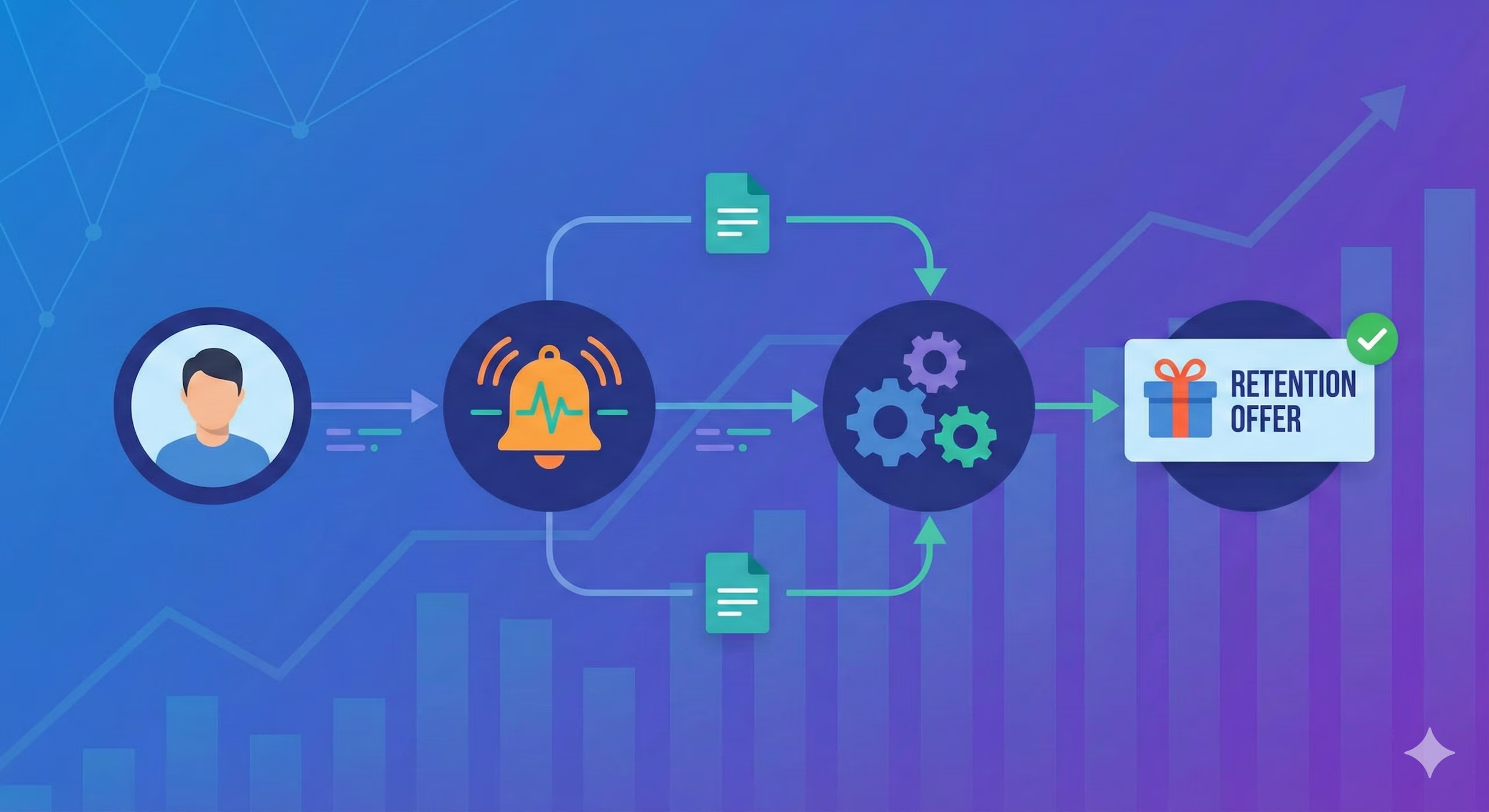
What is Automated Customer Retention?
Automated customer retention is the practice of deploying retention strategies automatically—without human intervention—at the moment a customer shows intent to leave.
Instead of:
- Waiting for a customer to click "cancel"
- Having a CS rep see the alert
- Scheduling a call 3-5 days later
- Hoping negotiation works
With automation, you:
- Detect churn intent (engagement drop, health score decline, cancellation page visit)
- Immediately surface a personalized retention offer in real-time
- Let the customer decide (accept offer, request discount, pause, or leave)
- Measure which offers work for which customer types
The difference is timing and scale. Without automation, you're always reacting. With automation, you're always ready, 24/7, for every customer.
Why Manual Retention Doesn't Scale (And Why Automation Matters)
Most SaaS companies rely on their customer success teams to prevent churn. Here's the problem:
The Math Doesn't Work
If you have 500 customers and 5% monthly churn, that's 25 customers leaving per month. Your CS team can call maybe 5-10 of them. What about the other 15-20?
They churn silently. No outreach. No offer. No last chance to change their mind.
That's not because your CS team is lazy. It's because the scale is impossible without automation.
Timing is Critical
When a customer enters their cancellation flow, they've already made their decision 80% of the way. A CS call three days later is too late.
But a retention offer presented in that moment? That's when they're most receptive.
Automated retention acts in that window when it matters most.
Personalization at Scale
A $2K/year customer needs a different retention offer than a $50K/year customer. A customer on your basic plan needs different options than an enterprise customer.
Your CS team can't personalize for 500 customers individually. But automation can. It can check:
- Customer's MRR/ARR
- Health score (engagement, support issues, etc.)
- Plan tier and feature usage
- Previous offers that worked for similar customers
- Industry and company size benchmarks
And instantly serve the right offer to the right customer at the right time.
The Metrics: What Automated Retention Actually Achieves
These numbers compound quickly. If you save 5 customers per month from automated retention at $5K ARR each, that's $25K/month in saved revenue. At typical SaaS margins (70-80% gross margin), that's $17.5K/month in recovered gross profit.
And that's just churn prevention. Many companies see expansion revenue increase too—when a customer accepts a plan upgrade offer instead of churning, you've increased their value.
How Automated Retention Works: A Real Example
The Setup: You have ChurnZap installed on your cancellation flow. Your analytics platform (Amplitude, Mixpanel, etc.) shows you which customers are at-risk. Your health score tells you why.
Day 1 - The Trigger:
Sarah, a product manager at a mid-market client, visits the cancellation page. Her health score is 42 (at-risk), and her engagement has dropped 35% over the past month. She's been on the Pro plan for 18 months at $8K ARR.
Day 1 - The Intelligence:
ChurnZap checks: "Sarah is at-risk. She's on Pro. Her company size suggests she might benefit from our Enterprise features. Customers like Sarah who get Enterprise have 89% retention. Her engagement is low, so she might need support, not more features. Customers like Sarah who get support have 92% retention."
Day 1 - The Offer (Real-Time):
Instead of a default "we'll miss you" message, Sarah sees:
- Option 1: "Pause your subscription for 3 months while you focus on implementation" (recovers customers trying to save money)
- Option 2: "Switch to our Essentials plan for 50% off for 12 months" (keeps engaged customers at lower cost)
- Option 3: "Get 2 hours of free strategic consulting" (solves the engagement problem directly)
Sarah clicks Option 3. She gets a calendly link, books a consulting call, and doesn't cancel. Her engagement increases, her health score goes back up, and you've retained a customer.
The Result: $8K/year kept instead of lost. Not through a 30-minute sales call, but through automation responding in real-time.
Real Churn-Save Story: The Power of the Human Touch
While automation handles scale, sometimes a thoughtful human response makes all the difference. Here's a real example from a legaltech SaaS in our portfolio:
"Unfortunately, the product did not work well, the usability is not worth the cost. We made sure to try on different machines and browsers. Ultimately the tool did not work for us and we didn't get anything out of it, we tried and I wanted it to work better than other solutions. Requesting a refund, I already cancelled online."
The Response (written in 2 minutes):
"Sorry to hear that. We'll absolutely grant that refund request, but as a heads up we did proactively identify and fix the errors you had hit over the Thanksgiving break!
Would it be possible for us to nudge you to log back in and try to do what you were doing, just once more? If that's too much to ask, I can understand and we can just move forward promptly with the clean exit path. Just hoping to at minimum not leave you with a bad taste in the mouth from using our platform.
All the best,
-Alex"
The Result (4.5 minutes later):
Customer replied: "Appreciate it, I will plan to test again tonight/tomorrow and let you know."
The customer tested the product, it worked, they sent detailed UX feedback, and stayed on as a customer. $500 MRR saved.
- Didn't fight the refund request — Built trust by agreeing immediately, which opened the door to make a small ask
- Confirmed the fix was already done — This wasn't just talk; the tech team had actually fixed the bugs the customer encountered
- Made the smallest ask possible — "Just try it once more" with a clear stated reason (not leaving a bad impression)
- Partnered with the product team — You can't fight churn without actually fixing product issues fast
The Takeaway: Use automation for scale (reach every customer), but don't underestimate the power of a well-crafted human response for high-value situations. The best retention strategies combine both.
How to Implement Automated Retention
Step 1: Identify Your Churn Signals
Before you automate retention, you need to know what signals predict churn. These vary by business, but common ones include:
- Engagement signals: Logins dropping by 50%, feature usage declining, session duration decreasing
- Health signals: Health score dropping below a threshold, trend line negative
- Support signals: High ticket volume, negative sentiment, unresolved critical issues
- Behavioral signals: Visiting pricing page, reading comparison content, checking competitors
- Direct signal: Customer clicks "cancel" in your product
Start with 2-3 signals, not 10. Simplicity leads to faster implementation.
Step 2: Set Up Your Retention Offers
What options will you present to customers trying to cancel? Common ones include:
- Pause option: "Pause your subscription for 2-3 months, no charge" (works for budget-driven churn)
- Discount offer: "30% off for the next 6 months" (financial incentive)
- Plan downgrade: "Switch to a lower-cost plan instead of canceling" (keeps relationship, lowers cost)
- Feature unlock: "Unlock enterprise features for free for 30 days" (lets them try what they wanted)
- Support offer: "Get a dedicated success manager" (solves implementation problems)
- Feedback request: "Tell us why you're leaving" (data + potential recovery conversation)
The best companies test multiple offers and learn which ones work best for which customer segments.
Step 3: Deploy in Your Cancellation Flow
The moment a customer initiates cancellation, your retention offers appear. This is the critical difference from CS outreach—you're intervening before they've fully committed to leaving.
Location matters. Best practices:
- Show offers before final confirmation, not after
- Make offers easy to claim (one click, not a form)
- Show the most relevant offer based on customer data (not random)
- Include a feedback option (why are they leaving?)
Step 4: Measure and Iterate
Track metrics for each offer:
- Show rate: What % of canceling customers see the offer?
- Acceptance rate: What % accept the offer presented?
- Retention impact: Of customers who accept, how many stay long-term?
- Segment performance: Which offers work best for which customer types?
- Revenue impact: Net MRR recovered per retention
Update your offers quarterly based on what works. If pauses work great for SMB customers, use more pauses. If discounts work for enterprise, emphasize discounts.
Types of Automated Retention Systems
1. Cancellation Flow Automation
What it is: Deploy retention offers inside your product's cancellation flow.
Best for: Direct-to-consumer SaaS, companies with self-serve cancellation.
Examples: SaaS where users click "cancel subscription" in settings or billing page.
Pros: Fastest intervention possible (same screen where decision is made), highest conversion rates (40-60% accept), simplest to implement.
Cons: Requires control over your product cancellation UX, won't catch customers who cancel via support.
2. Churn Signal Automation
What it is: Send targeted offers via email/in-app when you detect churn signals (disengagement, health score drop) before they try to cancel.
Best for: Mid-market and enterprise SaaS, companies wanting to intervene before cancellation.
Examples: Email campaigns triggered by health score drop, in-app messages when engagement declines.
Pros: Intervenes earlier than cancellation flow (better recovery), can reach customers via multiple channels.
Cons: Lower acceptance rates than cancellation-flow offers (customer hasn't committed to leaving yet), requires careful segmentation (don't over-email).
3. Win-Back Automation
What it is: Automatically send win-back offers to recently churned customers.
Best for: Companies with high churn wanting to recover some revenue from exited customers.
Examples: Email series with 50% discount for first month, free trial of new features for ex-customers.
Pros: Captures customers who churn despite earlier intervention, relatively easy to set up.
Cons: Lower success rate than prevention, customers have already left (harder to re-engage).
4. Dunning & Payment Recovery Automation
What it is: Automatically retry failed payments, send payment reminders, and offer payment plans when payment fails.
Best for: Any subscription SaaS with involuntary churn from failed payments.
Examples: Automatic payment retry on day 3 and day 7 if initial payment fails. Offer to update payment method or switch to annual billing.
Pros: Recovers 15-25% of involuntary churn, works for every customer (no targeting needed).
Cons: Limited to payment-related churn only.
Getting Started: A Simple Playbook
Measure Your Baseline
Calculate current monthly churn rate. This is your starting point. (For 500 customers at 5% monthly churn = 25 customers/month)
Identify 2-3 Churn Signals
Pick your most predictive signals (health score drop, cancellation page visit, engagement decline). Start simple.
Design 3 Retention Offers
Create pause, discount, and support offers. Segment by customer value ($K ARR, plan tier). Test what resonates.
Implement (Choose Your Tool)
Use ChurnZap for cancellation flow automation, or build custom workflows in your CRM/email platform.
Launch & Measure Impact
Deploy to 100% of customers. Track show rates, acceptance rates, retention impact. Expect 10-20% of churn prevented in month 1.
Iterate & Expand
After 30 days, analyze which offers work best. Double down on winners. Add more offers or signals based on data.
Common Automation Mistakes (and How to Avoid Them)
Mistake #1: Offering the Same Thing to Everyone
If you present a 30% discount to a $100K ARR customer, you've just left $3K on the table. They might have accepted a plan upgrade or support offer instead.
Fix: Segment your offers by customer value and churn reason. Use the data you have (ARR, plan, support history) to serve the right offer.
Mistake #2: Discounting Too Much
A 50% discount on $10K ARR is $5K in lost revenue per year. If you recover 50 customers, that's $250K gone.
Fix: Start with lower discounts (10-20%) and test. Maybe your real problem is onboarding, not price. Try support offers before discount offers.
Mistake #3: Intervening Too Late
By the time you detect churn via email, the customer has often already left or committed mentally to leaving.
Fix: Intervene in your cancellation flow (immediate) rather than waiting to send email. This is why ChurnZap focuses on the cancellation moment.
Mistake #4: No Feedback Loop
If you don't know *why* customers are churning, you can't tailor offers. You're just offering discounts and hoping.
Fix: Always ask "why are you canceling?" in your retention offer. Use that feedback to improve your product or improve future offers.
Mistake #5: Over-Automating and Losing CS Touch
Some churn is recoverable via human conversation. If you automate everything, you lose those opportunities.
Fix: Use automation for volume (everyone gets offers). Use your CS team for high-value customers (they get personal calls). Complement, don't replace.
Expected ROI: What You Can Achieve
Conservative estimate (10% churn reduction):
- Company: 500 customers at $5K ARR average = $2.5M MRR
- Current monthly churn: 5% = 25 customers = $125K/month
- Churn reduction from automation: 10% = saves 2.5 customers/month = $12.5K/month
- Annual recovery: $150K
- Cost of retention automation tool: $500-1,500/month = $6K-18K/year
- Net annual benefit: $132K-144K
Aggressive estimate (20% churn reduction):
- Same company, 20% reduction = saves 5 customers/month = $25K/month
- Annual recovery: $300K
- Cost of tool: $12K-18K/year
- Net annual benefit: $282K-288K
Most companies fall somewhere between these estimates. The point: automated retention ROI is usually positive within the first month.
ChurnZap: Automated Retention Built for Cancellation Flows
ChurnZap is specifically designed to handle the retention automation scenario above. Instead of cobbling together multiple tools, ChurnZap sits right in your cancellation flow and handles:
- Real-time offer deployment: Shows the right offer the moment a customer tries to cancel
- Smart segmentation: Serves different offers based on customer value, health, and plan tier
- Feedback collection: Asks why they're leaving so you can improve
- Fast implementation: Weeks, not months. Works with any payment processor (Stripe, Braintree, Paddle, etc.)
- Measurable impact: See in real-time how many customers you're saving and at what cost
The Bottom Line: Automation is the Only Way to Scale Retention
Manual churn prevention—CS teams calling customers—is important. But it doesn't scale. If you have 100+ customers, you cannot manually prevent all churn.
Automated retention lets you:
- Intervene for 100% of at-risk customers, not just the top 10%
- Act in the critical moment (cancellation flow), not days later
- Personalize offers by customer value and reason for churn
- Recover 15-25% of churn systematically
- Free up your CS team for customers who need personal attention
The companies winning at retention are doing both: smart analytics to identify churn + automated retention to prevent it.
Related Content
- SaaS Analytics Tools for Churn & Retention — Understand the data that triggers automated retention
- Customer Health Scoring — Build the signals that predict churn
- ChurnZero Pricing & Alternatives — Compare platforms that identify vs. automate churn prevention
- How to Reduce SaaS Churn: 10 Proven Strategies — Tactical strategies to complement automation